Introduction
It can be useful to know which .dll files an application has loaded when analyzing DLL-related problems.
Getting a list of DLLs via PowerShell
An easy way to obtain a list of loaded libraries is by using PowerShell as this is installed on most modern Windows systems already and can be used without installing additional software.
For this you can use the command below, note however that this command only works for 64-bit processes and from a 64-bit PowerShell. 32-bit processes or using a 32-bit PowerShell to run the command will produce no usable output. The timeout at the start can be modified to give you more time to get the Window into foreground that you would like to get the libraries for.
In PowerShell:
Start-Sleep 3; Add-Type '[DllImport("user32.dll")] public static extern IntPtr GetForegroundWindow();' -Name U -Namespace U; $proc = (Get-Process | ? {$_.MainWindowHandle -eq [U.U]::GetForegroundWindow()}); Write-Host "Window: $($proc.MainWindowTitle)"; Write-Host "PID: $($proc.Id)"; $proc.Modules.FileName
In Command Prompt (cmd.exe):
powershell.exe -NoProfile -Command "Start-Sleep 3; Add-Type '[DllImport("user32.dll")] public static extern IntPtr GetForegroundWindow();' -Name U -Namespace U; $proc = (Get-Process | ? {$_.MainWindowHandle -eq [U.U]::GetForegroundWindow()}); Write-Host "Window: $($proc.MainWindowTitle)"; Write-Host "PID: $($proc.Id)"; $proc.Modules.FileName"
If the command ran correctly, it creates output like below:
Window: Unbenannt - Editor
PID: 28144
C:\Windows\System32\notepad.exe
C:\WINDOWS\SYSTEM32\ntdll.dll
C:\WINDOWS\System32\KERNEL32.DLL
C:\WINDOWS\System32\KERNELBASE.dll
[...]
Getting list of DLLs with Process Explorer
Another convenient tool is Microsoft's Process Explorer tool.
Viewing the list of currently loaded DLLs
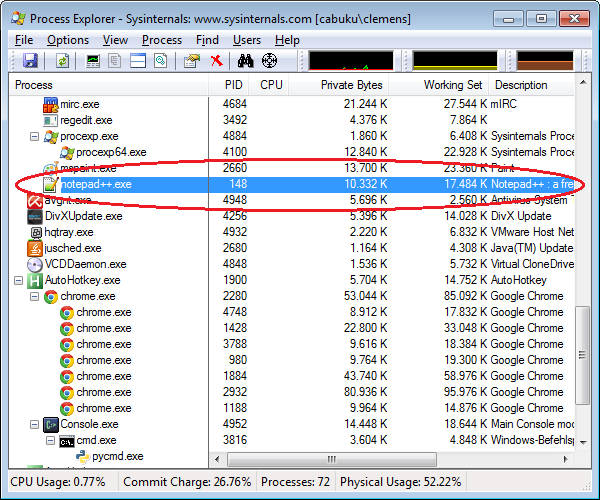
⚠️ After starting Process Explorer select the process or application that you want to inspect. We have used notepad++.exe in this example:
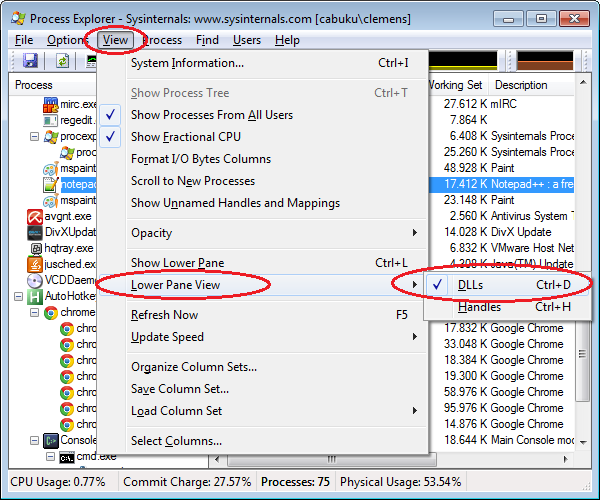
Then click View→Lower Pane View→DLLs (or press Ctrl+D):
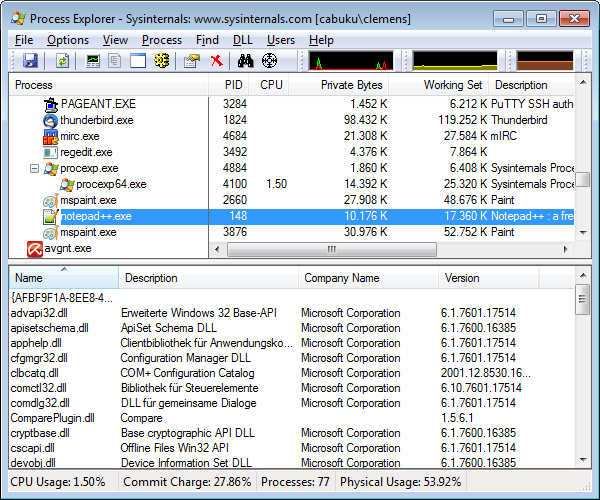
⚠️ Now the lower pane view is visible; it lists the DLLs loaded by the selected process only!
Saving the list of DLLs of the selected process
The list of DLLs of the selected (!) process can be saved (which is useful if you want someone else to look at it) by clicking File→Save as... (or press Ctrl+A):
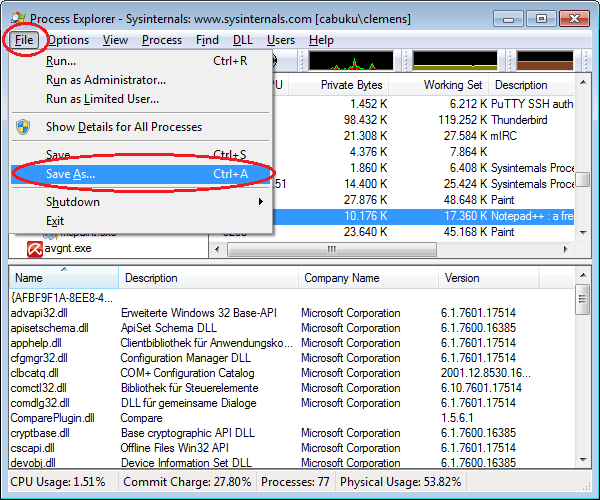
The resulting file starts with the process list and after that it lists the selected process's DLLs:
[...]

Process: notepad++.exe Pid: 148

Name	Description	Company Name	Version
{AFBF9F1A-8EE8-4C77-AF34-C647E37CA0D9}.1.ver0x000000000000001f.db
advapi32.dll	Erweiterte Windows 32 Base-API	Microsoft Corporation	6.1.7601.17514
apisetschema.dll	ApiSet Schema DLL	Microsoft Corporation	6.1.7600.16385
apphelp.dll	Clientbibliothek für Anwendungskompatibilität	Microsoft Corporation	6.1.7601.17514
cfgmgr32.dll	Configuration Manager DLL	Microsoft Corporation	6.1.7601.17514
[...]
Getting list of DLLs with ListDLLs
The command line tool ListDLLs from Microsoft can also list the DLLs loaded by a process:
C:\Users\myuser>listdlls notepad.exe
ListDLLs v3.1 - List loaded DLLs
Copyright (C) 1997-2011 Mark Russinovich
Sysinternals - www.sysinternals.com

------------------------------------------------------------------------------
notepad.exe pid: 7972
Command line: "C:\Windows\system32\notepad.exe"

Base                Size      Path
0x00000000ff880000  0x35000   C:\Windows\system32\notepad.exe
0x0000000077000000  0x1a9000  C:\Windows\SYSTEM32\ntdll.dll
0x0000000076ee0000  0x11f000  C:\Windows\system32\kernel32.dll
0x00000000fd720000  0x6c000   C:\Windows\system32\KERNELBASE.dll
0x00000000fed20000  0xdb000   C:\Windows\system32\ADVAPI32.dll
0x00000000fd830000  0x9f000   C:\Windows\system32\msvcrt.dll
0x00000000fdb10000  0x1f000   C:\Windows\SYSTEM32\sechost.dll
0x00000000ff0d0000  0x12d000  C:\Windows\system32\RPCRT4.dll
0x00000000ff200000  0x67000   C:\Windows\system32\GDI32.dll
0x0000000076920000  0xfa000   C:\Windows\system32\USER32.dll
0x00000000feeb0000  0xe000    C:\Windows\system32\LPK.dll
0x00000000fd9e0000  0xc9000   C:\Windows\system32\USP10.dll
0x00000000ff270000  0x97000   C:\Windows\system32\COMDLG32.dll
0x00000000fee30000  0x71000   C:\Windows\system32\SHLWAPI.dll
0x00000000fbcc0000  0x1f4000  C:\Windows\WinSxS\amd64_microsoft.windows.common-controls_6595b64144ccf1df_6.0.7601.17514_none_fa396087175ac9ac\COMCTL32.dll
0x00000000fdf90000  0xd88000  C:\Windows\system32\SHELL32.dll
0x00000000f8c50000  0x71000   C:\Windows\system32\WINSPOOL.DRV
0x00000000feec0000  0x203000  C:\Windows\system32\ole32.dll
0x00000000fdcd0000  0xd7000   C:\Windows\system32\OLEAUT32.dll
0x00000000fc3b0000  0xc000    C:\Windows\system32\VERSION.dll
0x00000000fee00000  0x2e000   C:\Windows\system32\IMM32.DLL
0x00000000fd8d0000  0x109000  C:\Windows\system32\MSCTF.dll
0x00000000fd390000  0xf000    C:\Windows\system32\CRYPTBASE.dll
0x00000000fb9d0000  0x56000   C:\Windows\system32\uxtheme.dll
0x00000000fb5d0000  0x18000   C:\Windows\system32\dwmapi.dll
Saving the list of DLLs
For this standard I/O redirection can be used:
listdlls notepad.exe >temp.txt
The output of the command is then contained in the file temp.txt.