Overview
This is a follow-up to Squish GUI Testing with Docker: XVFB for X11 Auts (the X11 article), which covered a Docker + Xvfb setup for Squish. Most of that carries over unchanged. This article only covers what's different when the AUT is a Wayland-native application instead of an X11 one.
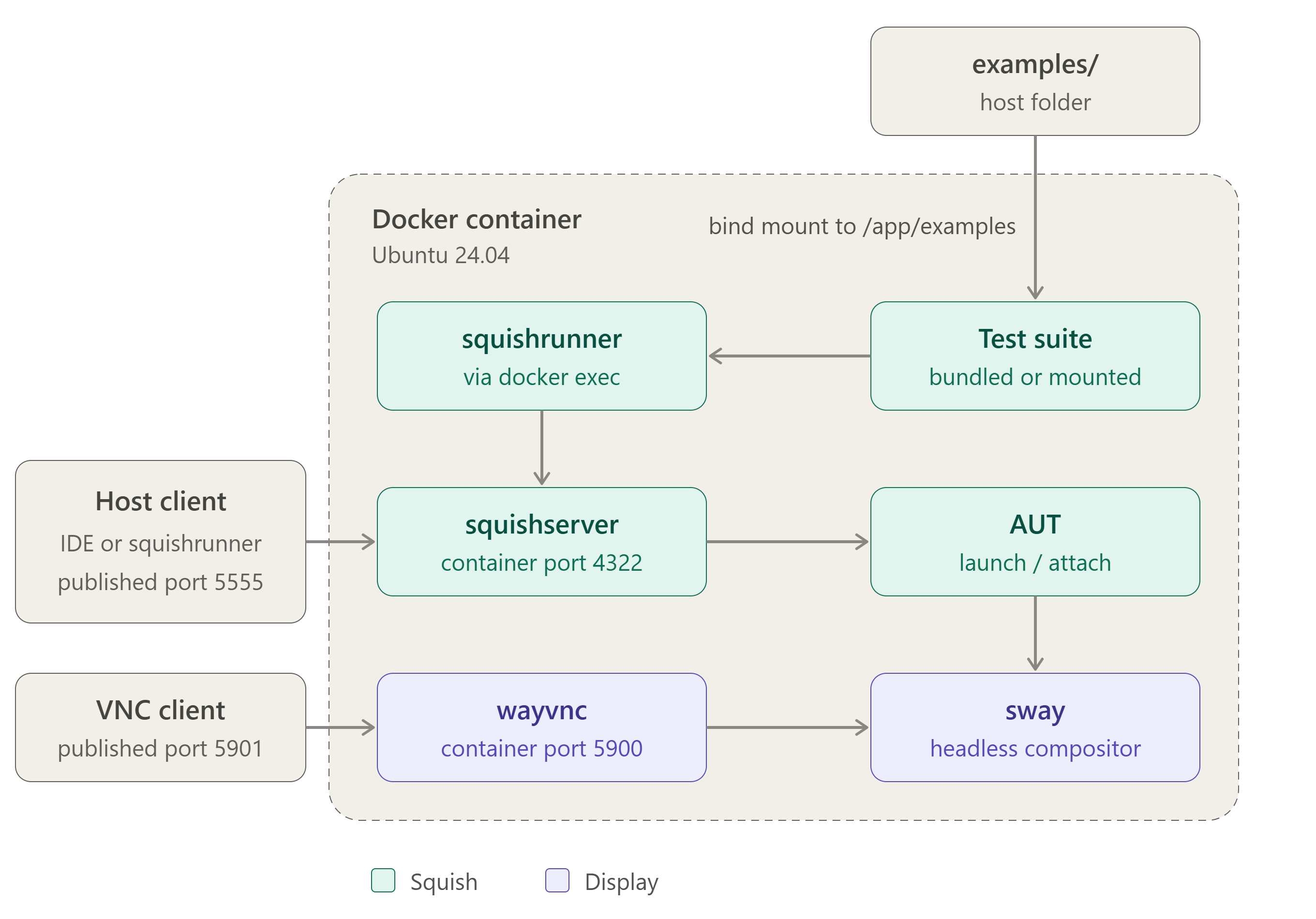
Figure 1: Ports are published with -p 5555:4322 (squishserver) and -p 5901:5900 (VNC). Tests can run inside the container with docker exec, where squishrunner reaches squishserver on localhost:4322, or from a host client through published port 5555. The test suite is either bind-mounted from the host examples folder at /app/examples or taken from the examples bundled with the Squish installation in /app/squish/examples.
Why Wayland Needs a Different Setup
Xvfb only emulates an X11 display. It can't host a Wayland client, because Wayland applications need a Wayland compositor to connect to, not an X server.
This project runs sway instead, forced onto its headless backend (WLR_BACKENDS=headless, WLR_RENDERER=pixman) so it doesn't probe for a GPU or a host X server that doesn't exist in the container. cage and weston are also viable wlroots-based alternatives. Sway was chosen mainly for its maturity and documentation.
Known limitations: Pure Wayland mode has restrictions: desktop screenshots aren't possible, object screenshots depend on the compositor, and native input injection functions (
nativeType(),nativeMouseClick(),mousePress(), etc.) and object highlighting don't work. If your test suite depends on any of these, verify against this setup directly. See Automating Qt applications on Wayland-based systems for details.
Extra Build Step: Wayland-Enabling the Example AUT
The bundled Qt Quick example needs Qt's Wayland platform plugins and client libraries, which aren't part of Squish's own bundled Qt runtime. At build time, setup-aut-qt-wayland.sh:
- Installs aqtinstall using Squish's bundled Python.
- Downloads Qt 6.8 with the
qtwaylandcompositormodule. - Copies the Wayland platform, shell-integration and graphics-integration plugins, plus the client libraries, into Squish's example directory.
- Refreshes the linker cache so the AUT can find them at runtime.
This runs once at build time, so the resulting image is self-contained.
Prerequisites
Same as the Squish GUI Testing with Docker: XVFB for X11 Auts article.
Project Files
Download: docker_squish_ubuntu24_sway.zip
- Dockerfile: builds the image with sway, wayvnc, the Wayland client libraries, Squish's XCB/X11 dependencies and locale packages.
- install_squish.sh: unattended Squish install (examples included, IDE and docs excluded, telemetry disabled).
- start.sh: the entrypoint. Starts sway headless, detects the Wayland socket, starts wayvnc and squishserver, and registers the AUT according to
AUT_MODE. - setup-aut-qt-wayland.sh: the Wayland-enabling step described above.
- docker-compose.yml: optional alternative to
docker build/docker run, with the same ports, environment variables and volume mount. - examples/: bind-mount target for running a suite (e.g.
suite_py) from the host instead of the one bundled in the image.
Configure the Dockerfile
Before building, set these two values in the Dockerfile:
ENV QT_LICENSE_SERVER=<qls_server_url>
ENV SQUISH_INSTALLER=squish-9.2.2-qt68x-linux64.run
If you're using a legacy FLS, you can adjust the install_squish.sh script by changing: license-server-qt=${QT_LICENSE_SERVER} telemetry=0 to license-server-floating=<host:port>.
The rest of the file installs sway, wayvnc and the Wayland client libraries, adds Squish’s XCB/X11 dependencies, sets a UTF-8 locale (Qt needs it), and runs the Squish installation and Wayland setup scripts at build time.
Build
From the project directory, with the Squish installer file alongside the Dockerfile:
docker build -t squish-ubuntu-wayland .
Run
The launch/attach modes work as in the X11 article and are selected with AUT_MODE.
Launch mode (default):
docker run --rm -it \
  --name squishwayland \
  -p 5901:5900 -p 5555:4322 \
  squish-ubuntu-wayland
Attach mode:
docker run --rm -it \
  --name squishwayland \
  -e AUT_MODE=attach \
  -p 5901:5900 -p 5555:4322 \
  squish-ubuntu-wayland
Running Tests
This is identical to the X11 article. Use docker exec to run squishrunner against the bundled example, or mount your own suite the same way.
docker exec -it squishwayland \
  /app/squish/bin/squishrunner \
  --testsuite /app/squish/examples/qt5/quickaddressbook/suite_quickaddressbook_js
Docker Compose
As an alternative to docker build and docker run, Compose keeps the build, ports, environment variables and volume in one file:
services:
  squishwayland:
    build:
      context: .
      dockerfile: Dockerfile
    image: squish-ubuntu-wayland:24
    container_name: squishwayland
    restart: unless-stopped
    ports:
      - "5901:5900" # VNC
      - "5555:4322" # squishserver
      # - "9991:9999" # AUT port, if needed
    environment:
      AUT_MODE: "launch"
    volumes:
      - ./examples:/app/examples
The Squish installer .run file must be in the build context. Start with docker compose up -d and stop with docker compose down.
Remote Viewing (VNC)
wayvnc replaces x11vnc and serves the same purpose: viewing the otherwise invisible compositor output. Connect the same way as in the "Connecting via VNC" section of the X11 article:
vncviewer localhost:5901
Security:
start.shconfigures no authentication (wayvnc'senable_authdefaults to off). As in the X11 article, don't expose this beyond your own machine without adding authentication.
Notes:
- Instead of installing Squish inside the image, you can install it on a Linux host, reduce it (see Reduce size of Squish Installation), and copy the reduced package into the image. These cuts build time and image size.
- On Apple Silicon Macs, when executing docker commands use
--platform linux/amd64, because this image supports amd64 only.