Overview
This is a follow-up to One-up Your Squish GUI Testing With Docker Containers . It provides a reusable Ubuntu 24.04 reference image that generalizes the original one-off example. It keeps Xvfb and adds runtime AUT modes (launch and attach) and x11vnc for remote viewing. It is for X11 AUTs only. For Wayland AUTs, see Sway for Wayland AUTs article.
Docker isn't a VM and has no display server, so a GUI app in a plain container fails or runs headless. Xvfb, a software X11 server that renders to memory, gives the container a virtual screen.
Note: This is a baseline to adapt to your AUT, licensing and environment, not a production-ready solution. Review all scripts and configuration before use.
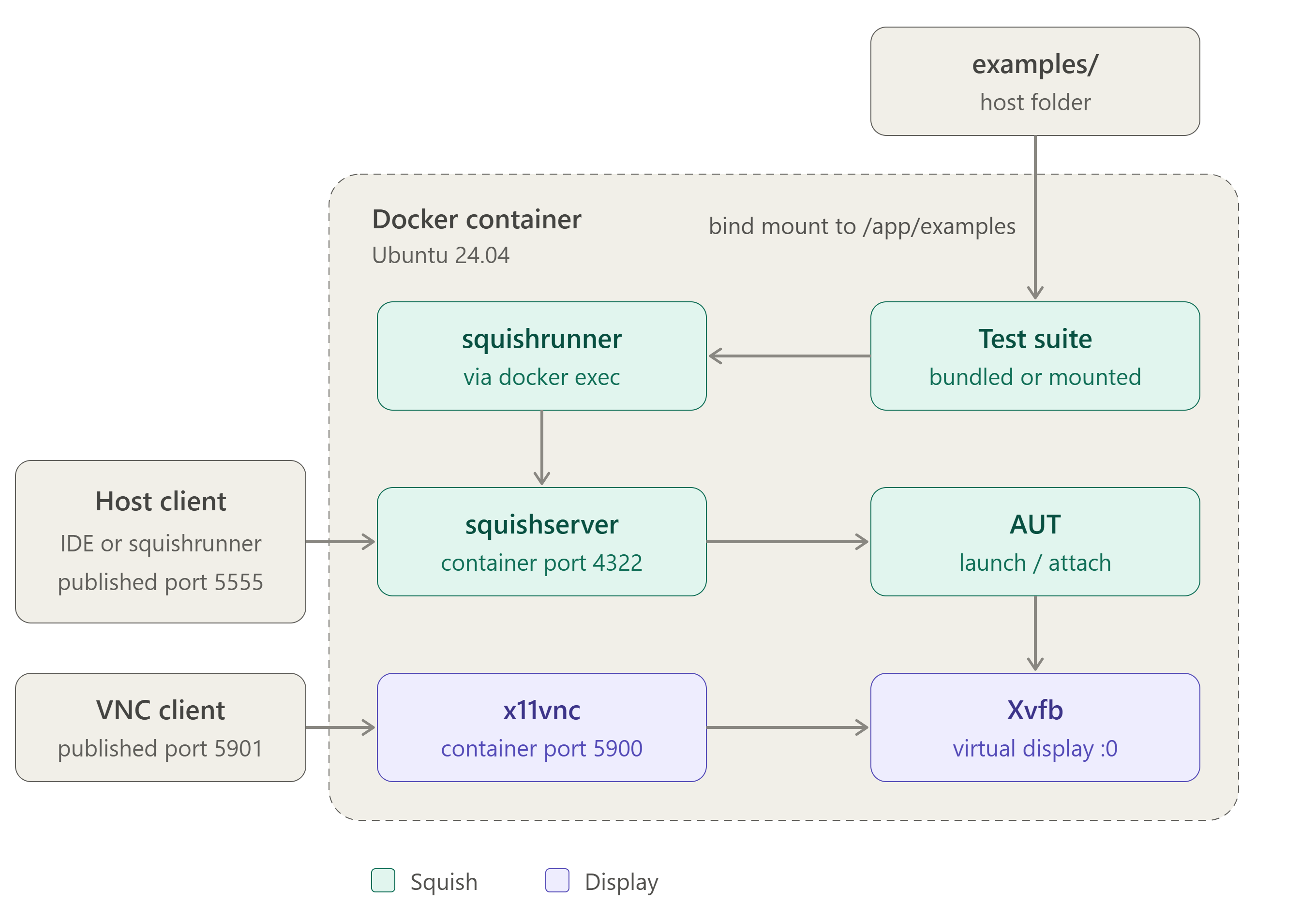
Figure 1: Ports are published with -p 5555:4322 (squishserver) and -p 5901:5900 (VNC). Tests can run inside the container with docker exec, where squishrunner reaches squishserver on localhost:4322, or from a host client through published port 5555. The test suite is either bind-mounted from the host examples folder at /app/examples or taken from the examples bundled with the Squish installation in /app/squish/examples.
Prerequisites
Before building the image, make sure you have:
- Docker Engine installed and running on the host machine. See this guide for installation instructions for your platform. The examples in this article were created and tested on Linux hosts.
- A valid Squish installer
.runfile for Linux, matching the target Qt version (the project currently defaults tosquish-9.2.2-qt68x-linux64.run). Download it from your customer portal and place it in the build directory. - Network access from the container environment to your Qt License Server. Set the
QT_LICENSE_SERVERenvironment variable in the Dockerfile to your Qt License Server (host|IP:port). - Familiarity with basic Docker concepts (image, container, build context). See the Docker overview if needed.
Project Files
Download: docker_squish_ubuntu24_xvfb.zip
- Dockerfile: builds the image, installs dependencies (Xvfb, x11vnc, Qt/X11 libraries, locales), copies in the scripts and installer, and exposes the ports.
- install_squish.sh: unattended Squish install into
/app/squish, usingQT_LICENSE_SERVER. The IDE and docs are excluded; the examples are kept for the AddressBook demo. - start.sh: the entrypoint. Starts Xvfb, x11vnc and squishserver, then registers the AUT according to
AUT_MODE. - docker-compose.yml: optional alternative to
docker build/docker run. - examples/: bind-mounted at
/app/examples, so you can run suites (e.g.suite_py) from the host. - README.md: usage documentation.
Configure the Dockerfile
The Dockerfile is in the project. Before building, set these two values:
ENV QT_LICENSE_SERVER=<qls_server_url>
ENV SQUISH_INSTALLER=squish-9.2.2-qt68x-linux64.run
If you're using a legacy FLS, you can adjust the install_squish.sh script by changing: license-server-qt=${QT_LICENSE_SERVER} telemetry=0 to license-server-floating=<host:port>.
The rest of the file installs the Xvfb, x11vnc and Qt/X11 dependencies, sets a UTF-8 locale (Qt needs it), installs Squish unattended, and removes the installer in the same layer to keep the image small. Unlike the original post's application-specific image, this one uses a generic Ubuntu base.
Build
docker build -t squish-ubuntu-xvfb-24:1.0.0 .
The Squish installer must be alongside the Dockerfile. Compose builds the image automatically as part of up.
Run
Launch mode (default): Squish registers and starts the AUT, as in the original post.
docker run --rm -it \
  --name squishx11 \
  -p 5901:5900 -p 5555:4322 \
  squish-ubuntu-xvfb-24:1.0.0
Attach mode (new): for AUTs that must be started separately. start.sh allows remote hosts in squishserverrc, registers an attachable endpoint and starts the AUT via startaut.
docker run --rm -it \
  --name squishx11 \
  -e AUT_MODE=attach \
  -p 5901:5900 -p 5555:4322 \
  squish-ubuntu-xvfb-24:1.0.0
Security: x11vnc runs with
-nopw(no password) for local testing. Add authentication or restrict access to port 5900 outside local/dev environments.
Running Tests
Using the bundled Squish example suite:
docker exec -it squishx11 /app/squish/bin/squishrunner \
  --testsuite /app/squish/examples/qt/addressbook/suite_py
squishrunner connects to squishserver on localhost:4322 inside the container. suite_py is the Python variant of the bundled AddressBook suite.
Using the example suite from this project:
Stop any running container first, because the name squishx11 is already in use. Then create the results folder and start the container with the examples folder bind-mounted (it contains suite_py):
mkdir -p examples/results
docker run --rm -it --name squishx11 -p 5901:5900 -p 5555:4322 \
  --mount type=bind,src="$(pwd)/examples",dst=/app/examples \
  squish-ubuntu-xvfb-24:1.0.0
Then, from a second terminal, run the suite from the bind-mounted folder:
docker exec -it squishx11 /app/squish/bin/squishrunner \
  --testsuite /app/examples/suite_py \
  --reportgen junit,/app/examples/results/results.xml
The JUnit report lands in ./examples/results/results.xml on the host, with no docker cp needed.
From Squish IDE: add localhost:5555 as a squishserver in the Squish IDE settings, or specify it in the script:
attachToApplication("addressbook", "localhost", 5555)
# or
startApplication("addressbook", "localhost", 5555)
5555 is the host-mapped squishserver port. The AUT is already registered by start.sh.
Remote Viewing (VNC)
Connect any VNC client to localhost:5901 (container port 5900, mapped by -p 5901:5900). No password is required by default. You'll see the virtual display (1920x1080, set in start.sh), including the running AUT. This is useful for watching a test run or debugging a failure.
Docker Compose
services:
  squishx11:
    build:
      context: .
      dockerfile: Dockerfile
    image: squish-ubuntu-xvfb-24:1.0.0
    container_name: squishx11
    restart: unless-stopped
    ports:
      - "5901:5900" # VNC
      - "5555:4322" # squishserver
      # - "9991:9999" # AUT port, if needed
    environment:
      AUT_MODE: "launch"
    volumes:
      - ./examples:/app/examples
The installer .run file must be in the build context. Start with docker compose up -d and stop with docker compose down.
Use Cases
- CI/CD: needs no real display and boots identically each time, so it fits GitLab CI, Jenkins and GitHub Actions.
- Consistent environments: the same OS, Squish version and dependencies for everyone.
- Parallel execution: isolated containers on different host ports can run several suites, or several AUT versions, at once.
- Debugging CI failures: connect via VNC to the exact container that failed.
- Fast onboarding: pull the image, mount your suite and run, with no local Squish install or license setup.
Notes:
- Instead of installing Squish inside the image, you can install it on a Linux host, reduce it (see Reduce size of Squish Installation), and copy the reduced package into the image. These cuts build time and image size.
- On Apple Silicon Macs, when executing docker commands use
--platform linux/amd64, because this image supports amd64 only.