Introduction
In a normal setup, TeamCity will by itself clean up all processes that are direct subprocesses of the agent or can be traced via process hierarchy.
If, however, a process is orphaned or the cleanup is not working correctly you will need to make sure that the processes that are launched by the agent are actually terminated when a Job ends or is canceled.
Solution
TeamCity has the option in the "Command Line" step to always run this step, regardless of the actual state of the Job.
To create such a step go to the Build page and add a new step.
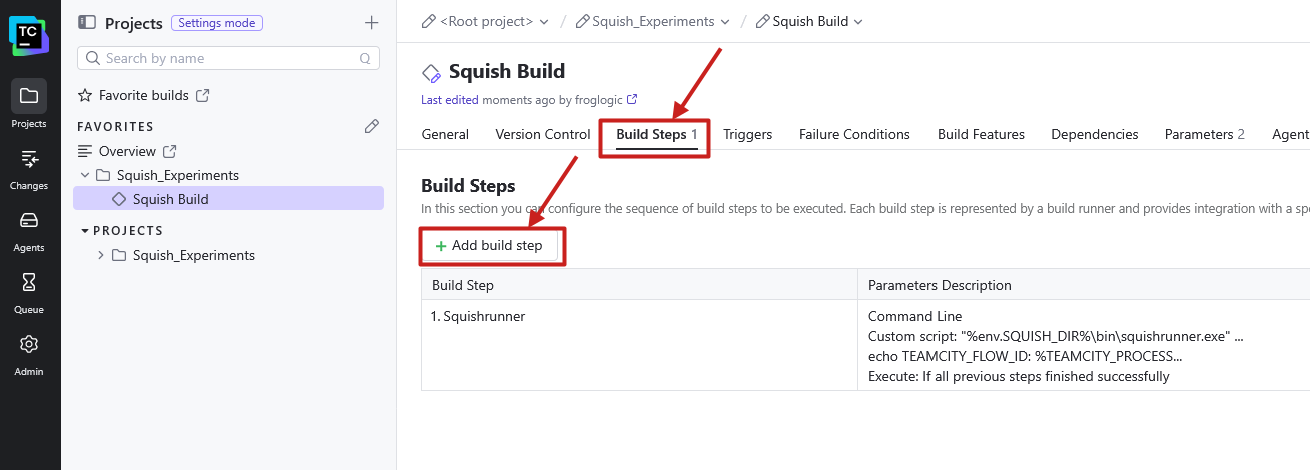
After that select "Command Line" from the list of runners.
In the Job creation select "Always, even if build stop command was issued" in the dropdown as to when the step is to be executed.
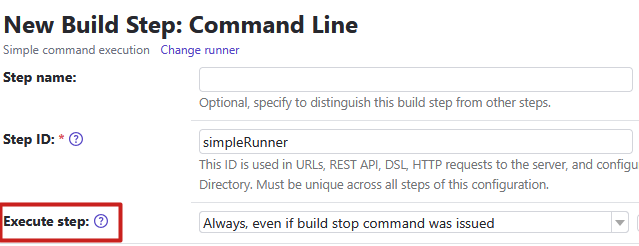
Now you have a step that can be used to run a shell script or .bat file to kill any processes that might still be around when a build gets canceled early.
If you want to use this step on Windows and Unix systems, then you should execute a .bat file from this command, and the script handles the actual termination of processes. On Windows you write the actual batch script with this file extension and on Unix you simply create a shell script with the same filename and extension.